If you’ve lost your Ivy RFID card, don’t worry — you can deactivate it and order a replacement directly through the Ivy app.
Select a topic below:
- 🚫 How to deactivate a lost RFID card
- 📦 How to order a replacement RFID card
- ⚡ How to start charging without your RFID card
How to deactivate a lost RFID card.
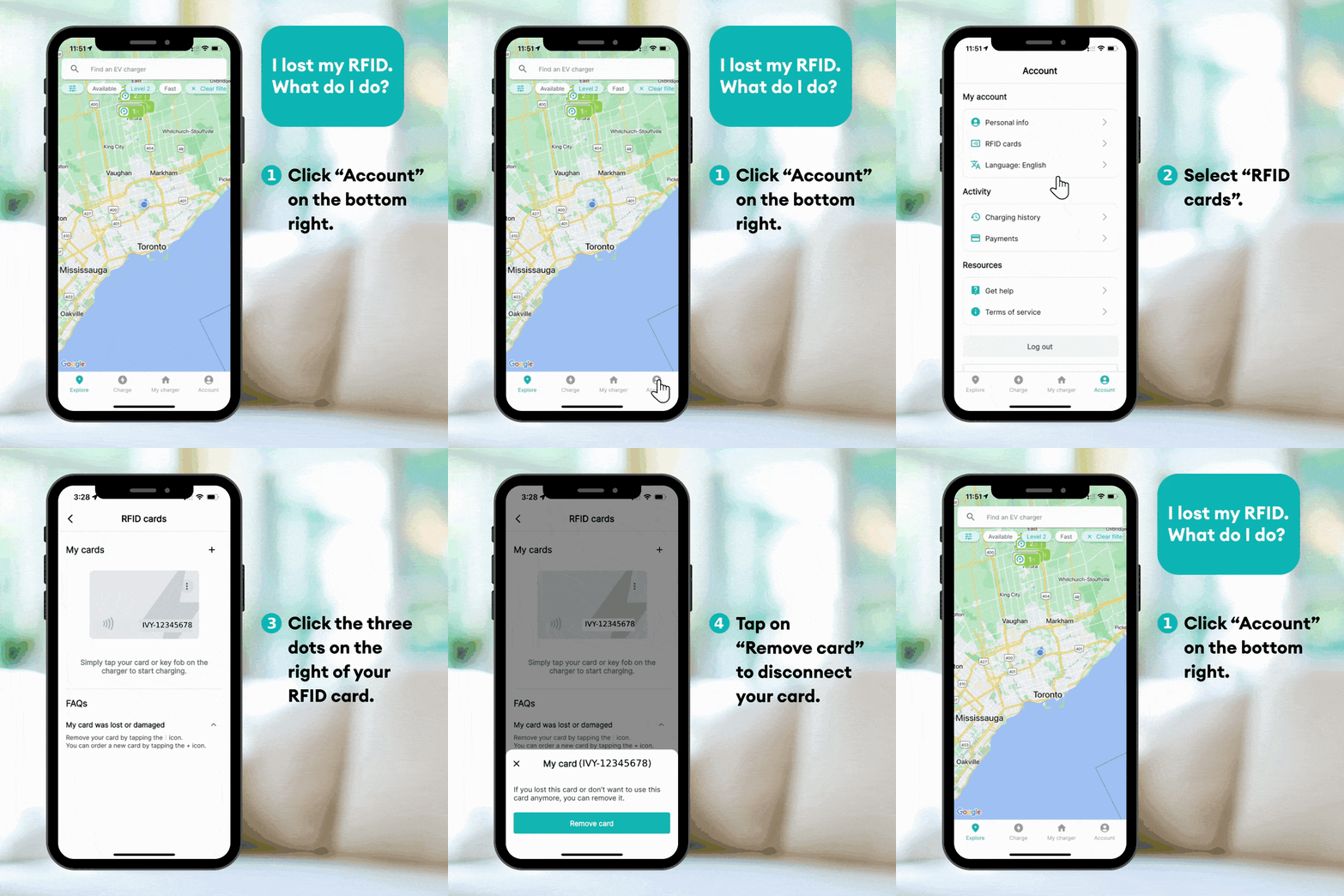
- Open the Ivy app and log in.
- Go to Account.
- Select RFID Card.
- Choose the card you would like to deactivate.
- Tap Deactivate to prevent unauthorized use.
Deactivating your card immediately ensures it can no longer be used to start charging sessions.
How to order a replacement RFID card.
- In the Ivy app, navigate to Account.
- Select RFID Card.
- Tap Order new RFID card.
- Confirm your shipping details.
- Submit your request.
Once received, you’ll need to activate your new RFID card before using it.
How to start charging without your RFID card.
While waiting for your replacement card, you can still start a charging session using:
- The Ivy mobile app
- QR code scanning at the charger
These methods allow you to continue charging without interruption.
Tip: If you suspect unauthorized use of your lost card, deactivate it as soon as possible through the app.