Once you receive your Ivy RFID card, you’ll need to activate it before using it to start charging sessions.
Follow the steps below to activate your card using the Ivy mobile app:
- 📋 Before you start
- 🔐 How to activate your RFID card
- ⚡ What happens next?
- ❓ Lost card or not working?
Before you start.
Make sure:
- You have downloaded the Ivy Charging Network mobile app
- You are logged into your Ivy account
- You have your RFID card with you
If you don’t have an account yet, you’ll need to create one in the app before activating your card.
How to activate your RFID card
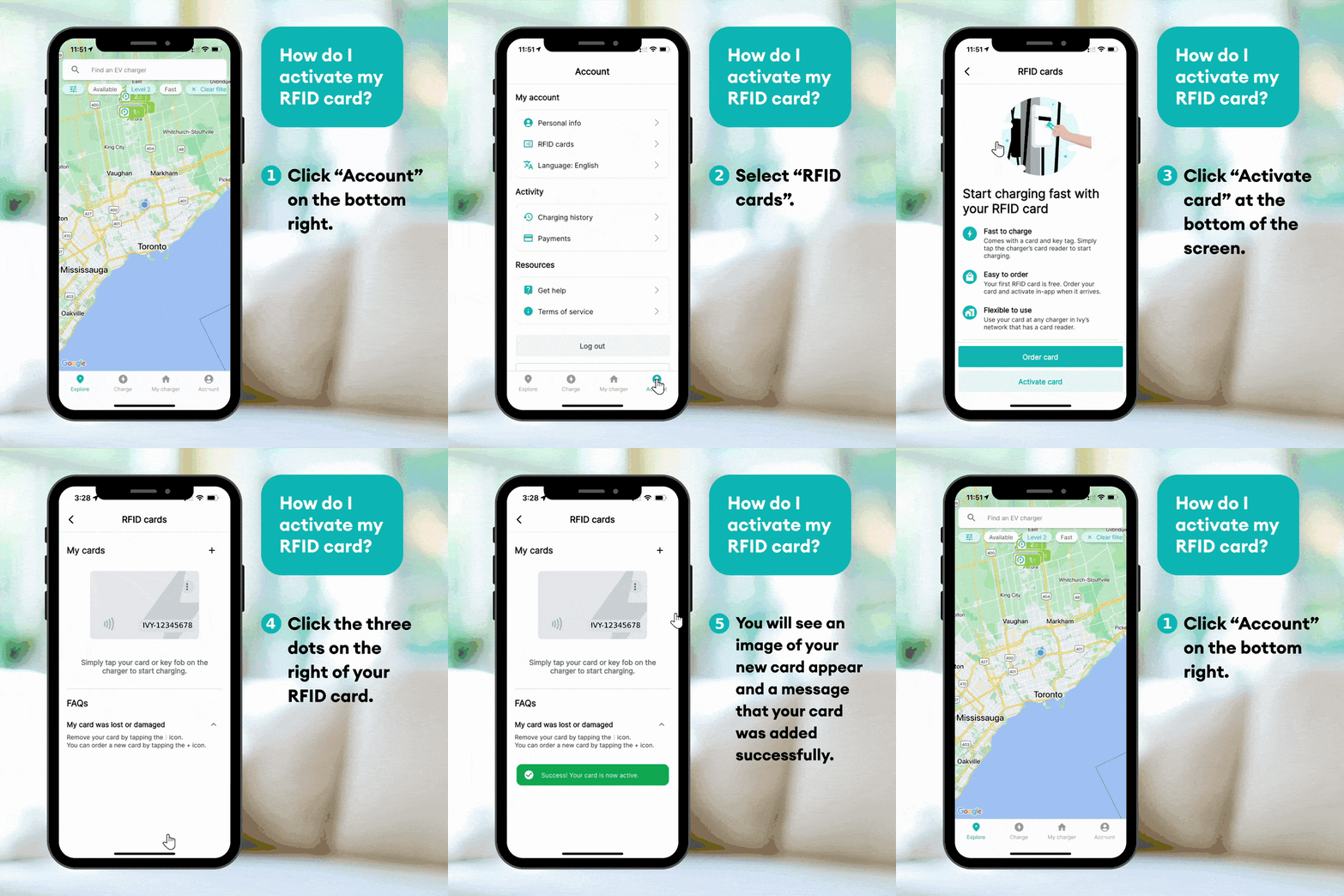
- Open the Ivy Charging Network app
- Log in to your account
- Navigate to the Account section
- Select RFID Cards
- Tap Add RFID Card
- Enter the RFID card number printed on your card
- Tap Activate
Once successfully activated, your RFID card will be linked to your account and ready to use.
What happens next?
After activation, you can start a charging session by:
- Tapping your RFID card on the charger’s card reader
- Selecting your charging port (if prompted)
Your charging session will be billed to the payment method saved in your Ivy account.
Lost card or not working?
If your RFID card is lost, damaged, or not working:
- Open the Ivy app
- Go to Account → RFID Cards
- Remove or deactivate the card
You can then order or activate a replacement card as needed.
If you need additional assistance, please contact support.