Ivy RFID cards allow you to quickly start a charging session by tapping your card on a charger.
Follow the steps below to order an RFID card through the Ivy mobile app:
Before you order.
To order an RFID card, you must:
- Have the Ivy Charging Network mobile app installed
- Be logged into your Ivy account
- Have a valid payment method added to your account (if applicable)
How to order an RFID card.
Follow the steps below to activate your Ivy RFID card in the mobile app:
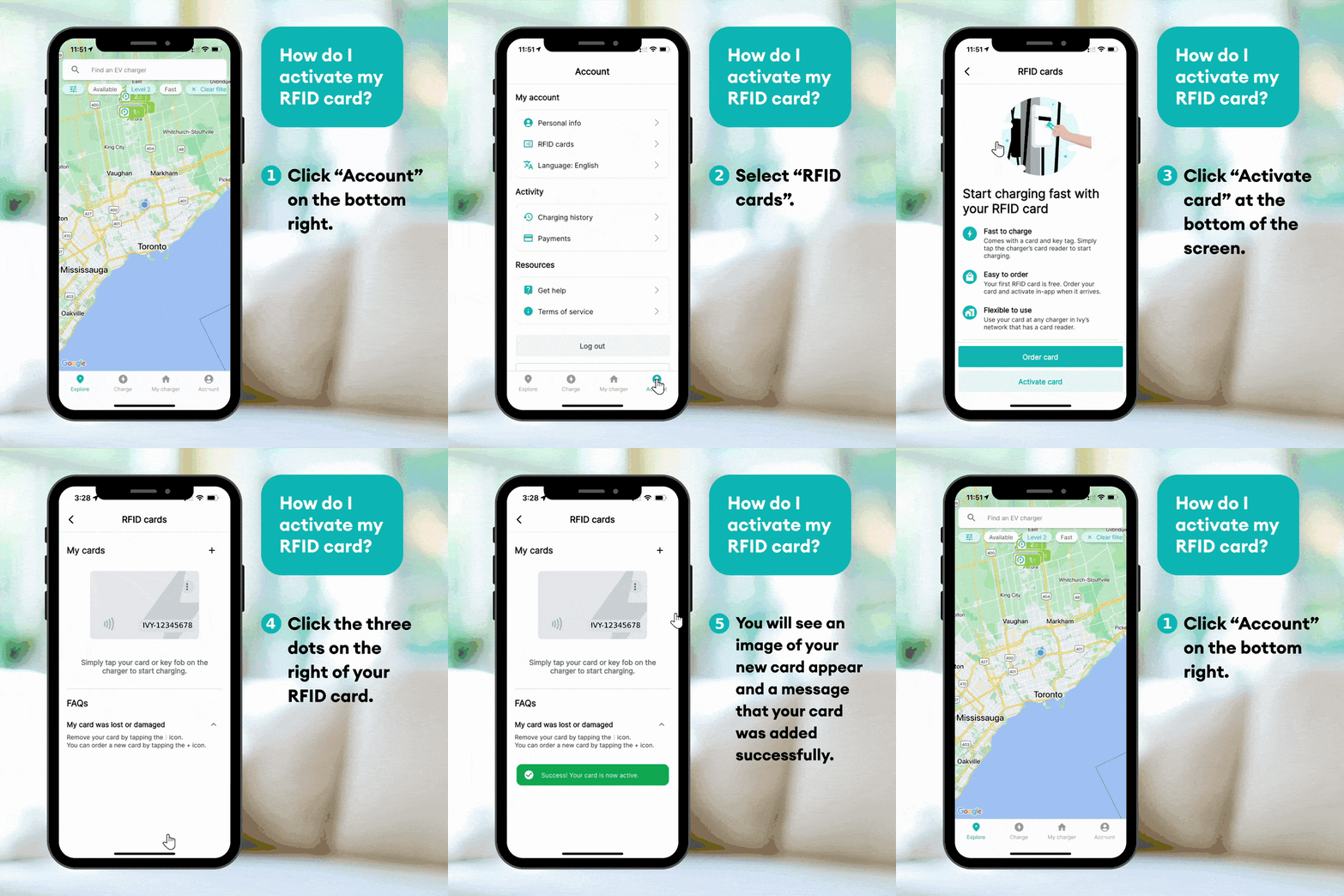
- Open the Ivy Charging Network app
- Log in to your account
- Go to the Account section
- Select RFID Cards
- Tap Order RFID Card
- Confirm your shipping details
- Submit your order
Once your order is placed, your RFID card will be mailed to the address provided.
Delivery information.
Delivery times may vary depending on your location.
If you have not received your RFID card within the expected timeframe, please contact Ivy Support for assistance.
After you receive your card.
Once your RFID card arrives, you must activate it before using it at an Ivy charging station.
To activate your card:
- Open the Ivy app
- Navigate to Account → RFID Cards
- Enter the RFID number printed on your card
- Tap Activate
After activation, you can start charging by tapping your RFID card at a compatible Ivy charger.
If you need assistance ordering or activating your RFID card, please contact support.